On 21 October 2026 PHP shipped an emergency security release for two critical bugs, now known as PHP2Shell (CVE-2026-109618 and CVE-2026-109619). Both are rated 9.2 out of 10 and can let an attacker run code on your server without logging in. If your website runs on WordPress, WooCommerce, Drupal, Joomla, Craft CMS, Laravel or any other PHP software, this affects you.
There is one catch that is confusing a lot of site owners. The PHP team only publishes ready-to-install downloads for Windows. On Linux, which runs most websites, the fix reaches you through your operating system or your hosting company, and some of them are still catching up. This guide explains what the bugs are, how to check your version, and how to patch on Windows, Linux and shared hosting, step by step with screens.
What happened
Security researchers found two flaws in PHP core, the part of PHP that handles every web request before your CMS or plugins even load. According to Yahoo Tech’s report, attacks started within hours of the release, and several government agencies in Europe took public sites offline as a precaution until they could patch.
- CVE-2026-109618: PHP can run out of memory while reading a file upload, then carry on with half-finished data. Attackers can turn this into running their own code.
- CVE-2026-109619: data from one visitor’s request is left behind in memory and the next request can trip over it. PHP’s upload progress feature, switched on by default for years, is a confirmed way in.
Because the problem sits below your application, a WordPress security plugin or a login screen cannot stop it. WordPress auto-updates will not fix it either, because they update WordPress, not PHP. The fix is to update PHP itself.
Which versions are fixed
| PHP branch | Fixed version | Status |
|---|---|---|
| PHP 8.5 | 8.5.12 | Supported |
| PHP 8.4 | 8.4.27 | Supported |
| PHP 8.3 | 8.3.36 | Supported |
| PHP 8.2 | 8.2.35 | Security fixes only, end of life on 31 December 2026 |
| PHP 8.1 and older | No official release | Source patches only for 7.4, 8.0 and 8.1. Plan an upgrade |
One important detail: Ubuntu, Debian and Red Hat often copy the fix into their own PHP packages without changing the version number. So a server showing PHP 8.3.6 on Ubuntu 24.04 can still be patched. On those systems you check the package version or the security notice, not just the number PHP reports.
Step 1: Check which PHP version your site uses
On WordPress, go to Tools → Site Health → Info and open the Server section. You will see the PHP version and how PHP runs on your server (for example FPM or an Apache module).
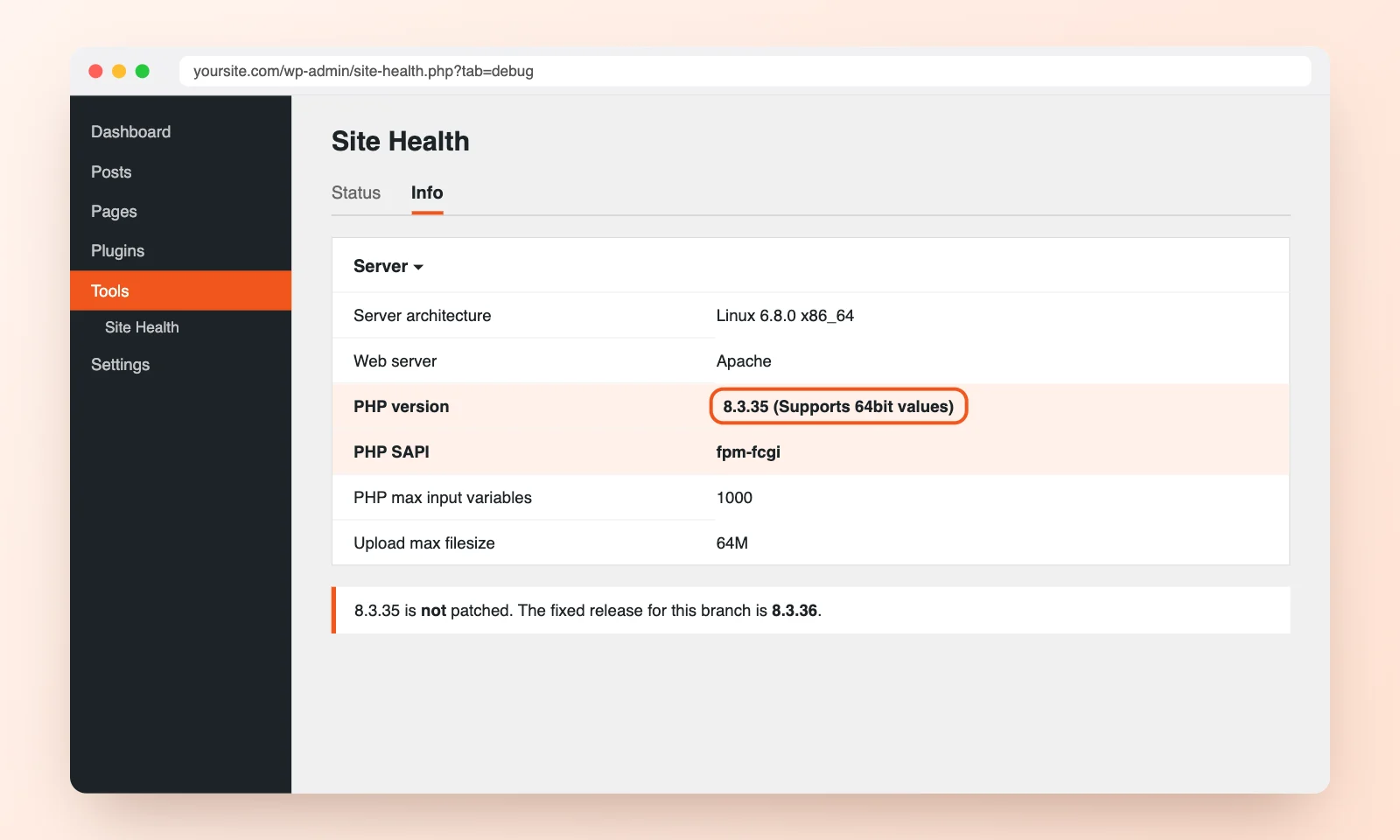
If you have server access, run php -v in a terminal. Keep in mind that the command line can use a different PHP from the one serving your website, so the Site Health screen or a phpinfo page is the more reliable check.
Step 2: Patch PHP on a Windows server
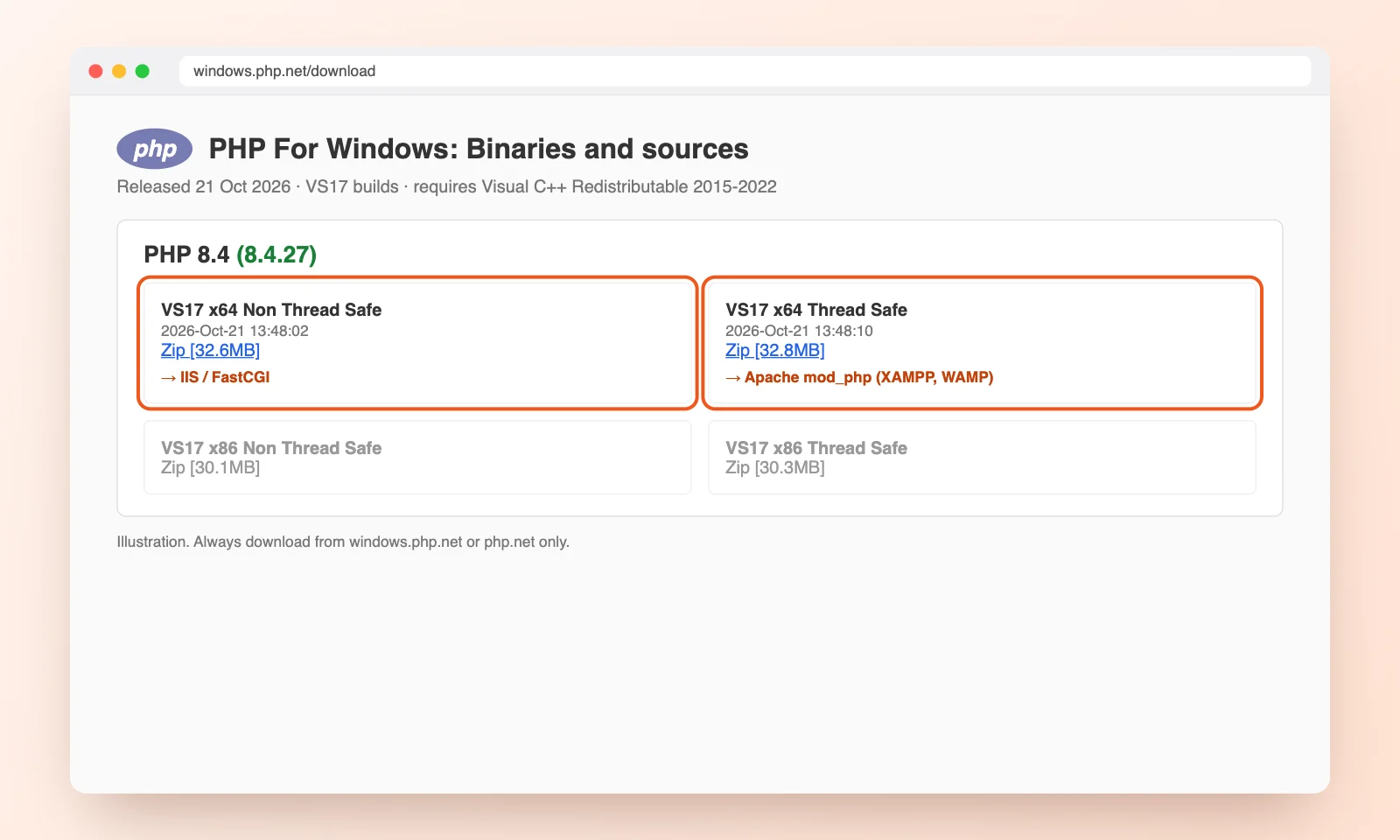
Windows is the one platform where you can download the fixed build straight from php.net today. This covers Windows servers running IIS or Apache, and local tools such as XAMPP or WAMP.
- Open the PHP for Windows download page and pick your branch, for example 8.4.
- Choose x64 Non Thread Safe if you run PHP through IIS (FastCGI). Choose x64 Thread Safe if PHP is loaded as an Apache module.
- Install the Microsoft Visual C++ Redistributable 2015 to 2022 if the server does not have it yet.
- Back up your current PHP folder, for example
C:\php, includingphp.iniand theextfolder. - Stop the web server, extract the new zip over the old folder, and copy your saved
php.iniback in. - Start the web server again and check the version.
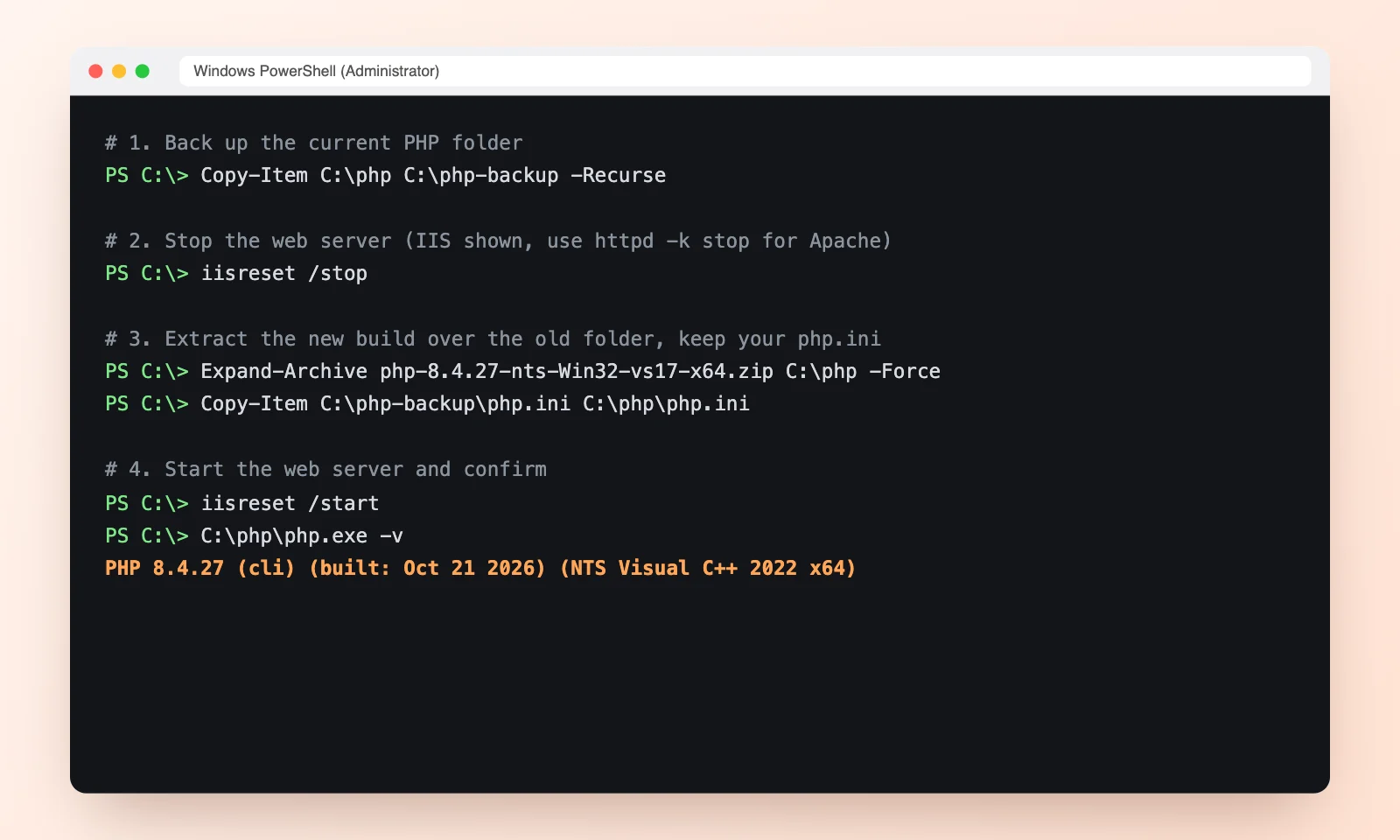
Note that Chocolatey, the Windows package manager, had not shipped the update at the time of writing, so download from php.net directly. Plesk for Windows users should wait for Plesk’s own update.
Step 3: Patch PHP on a Linux server
Most live websites run on Linux. php.net does not publish Linux downloads, so the fix comes from your distribution. At the time of writing, Ubuntu (22.04, 24.04 and newer), Debian 12 and 13, the official Docker PHP images, cPanel EasyApache 4 and Plesk for Linux had fixed packages. Red Hat Enterprise Linux and its rebuilds (AlmaLinux, Rocky), SUSE, Alpine and Amazon Linux were still pending, and the popular Remi repository said it would not have updates on release day.
Ubuntu and Debian
Update only your existing PHP packages, then restart PHP so the new version is actually loaded. Replace 8.3 with your own version.
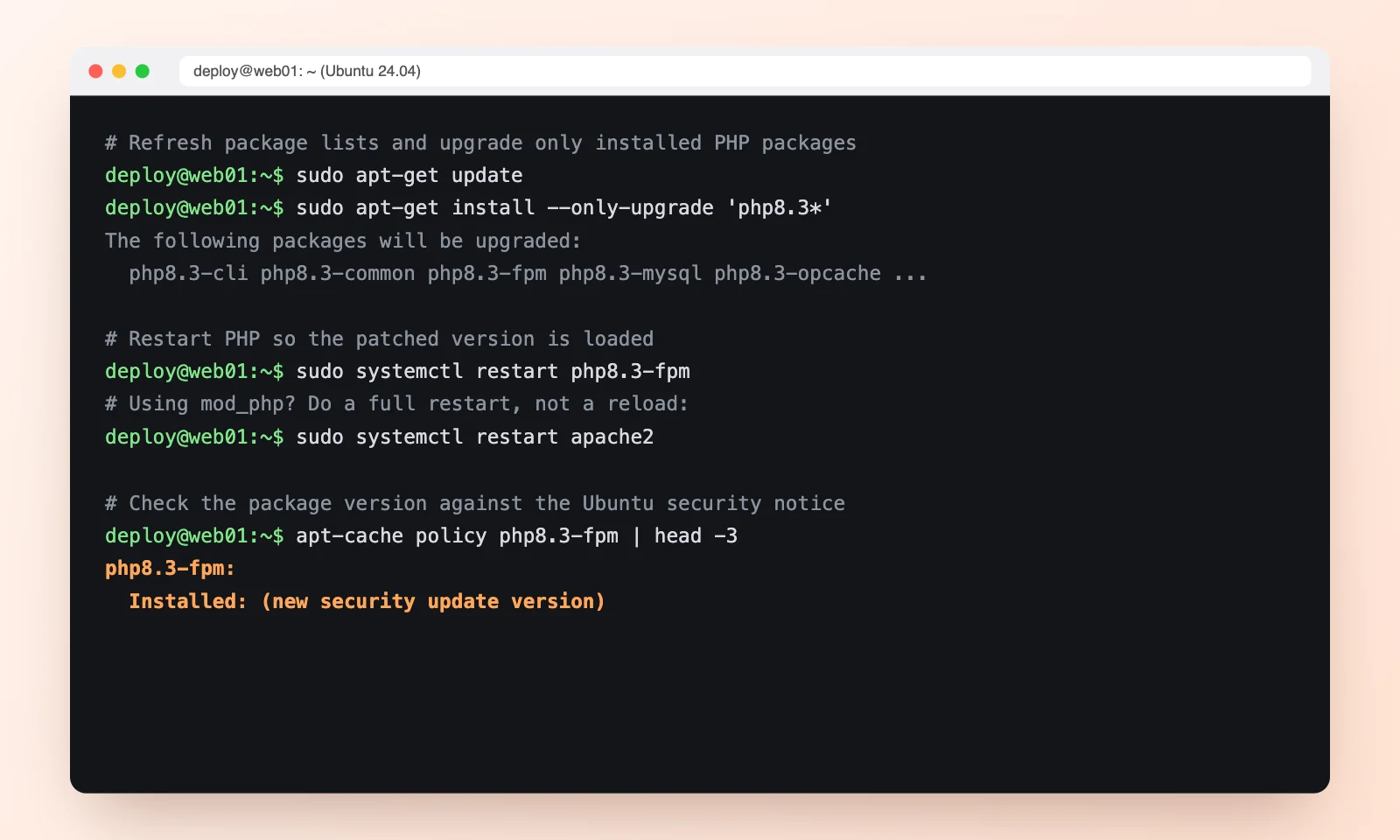
If PHP runs as an Apache module (mod_php), restart Apache fully with sudo systemctl restart apache2. A graceful reload is not enough. For LiteSpeed servers, update the lsphp packages and restart the PHP processes.
Red Hat, AlmaLinux and Rocky
Run sudo dnf upgrade 'php*' and restart php-fpm or httpd. If no fixed package is available for your system yet, apply the temporary protection in Step 5 today and patch as soon as the package lands.
Docker
Pull the new official image (for example php:8.4), rebuild your own images with docker build --pull, and recreate the containers. Updating packages inside a running container is not enough.
Step 4: Shared hosting, cPanel and managed WordPress hosting
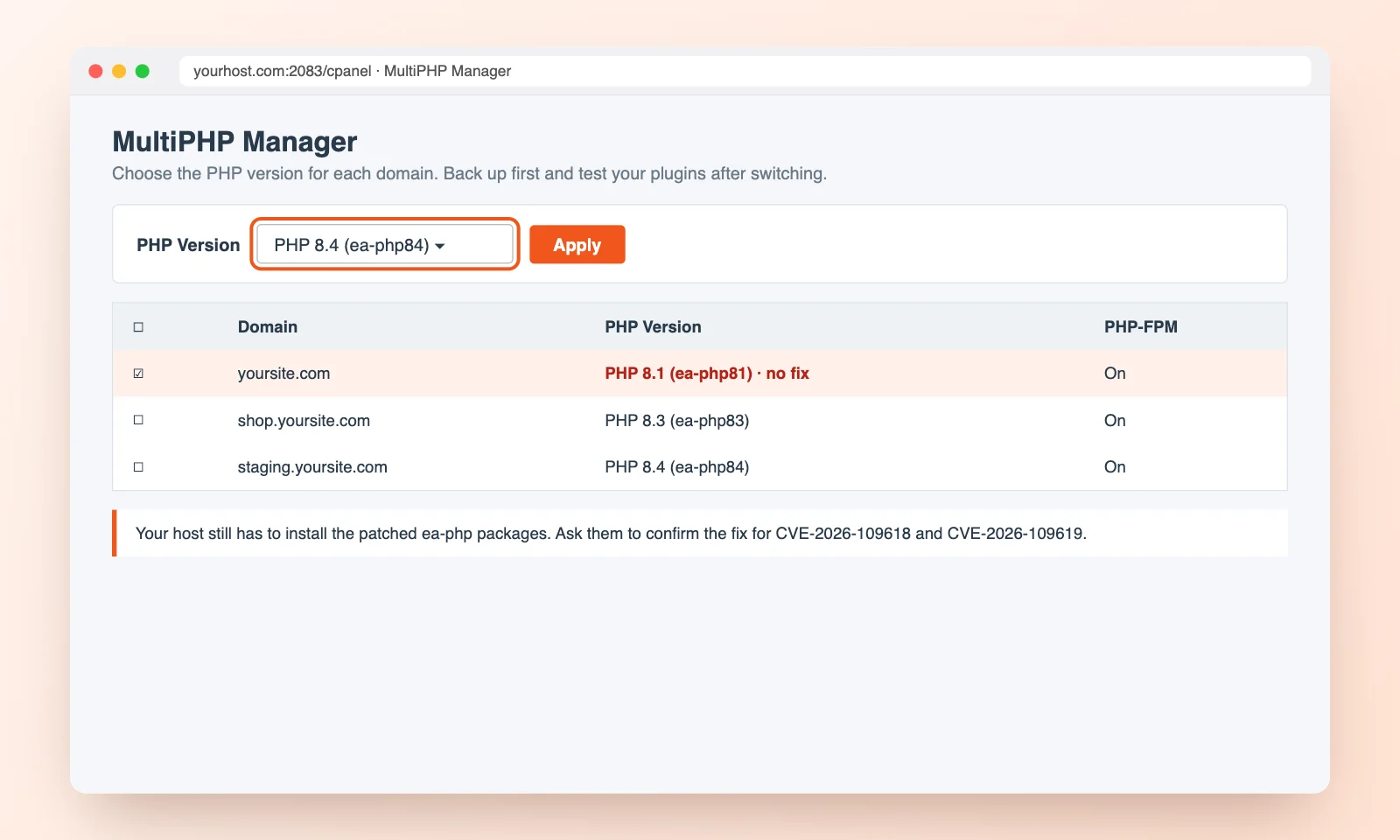
If you are on shared or managed hosting, your host controls PHP. Contact them and ask one direct question: “Has PHP on my account been updated for CVE-2026-109618 and CVE-2026-109619?”
While you wait, check the PHP version selector in your control panel. In cPanel this is MultiPHP Manager or Select PHP Version. If your site is on PHP 8.1 or older, switch it to a supported version such as 8.3 or 8.4, after taking a backup and testing that your theme and plugins work.
Step 5: Temporary protection if you cannot patch today
The PHP team is clear that updating is the only full fix. If you need a few hours or days, these steps lower the risk:
- Turn off PHP’s upload progress feature in
php.inior your PHP-FPM pool, then restart PHP. It must be set at server level. Setting it withini_set()or a.user.inifile does not work. - Keep file upload limits sensible, for example
post_max_sizeof 8M or 32M if you need larger uploads. - Put the site behind a web application firewall. Cloudflare has added rules for all customers, but calls them a stopgap only.
- For sites you cannot patch, restrict public access or take them offline until you can, as government security agencies advised.
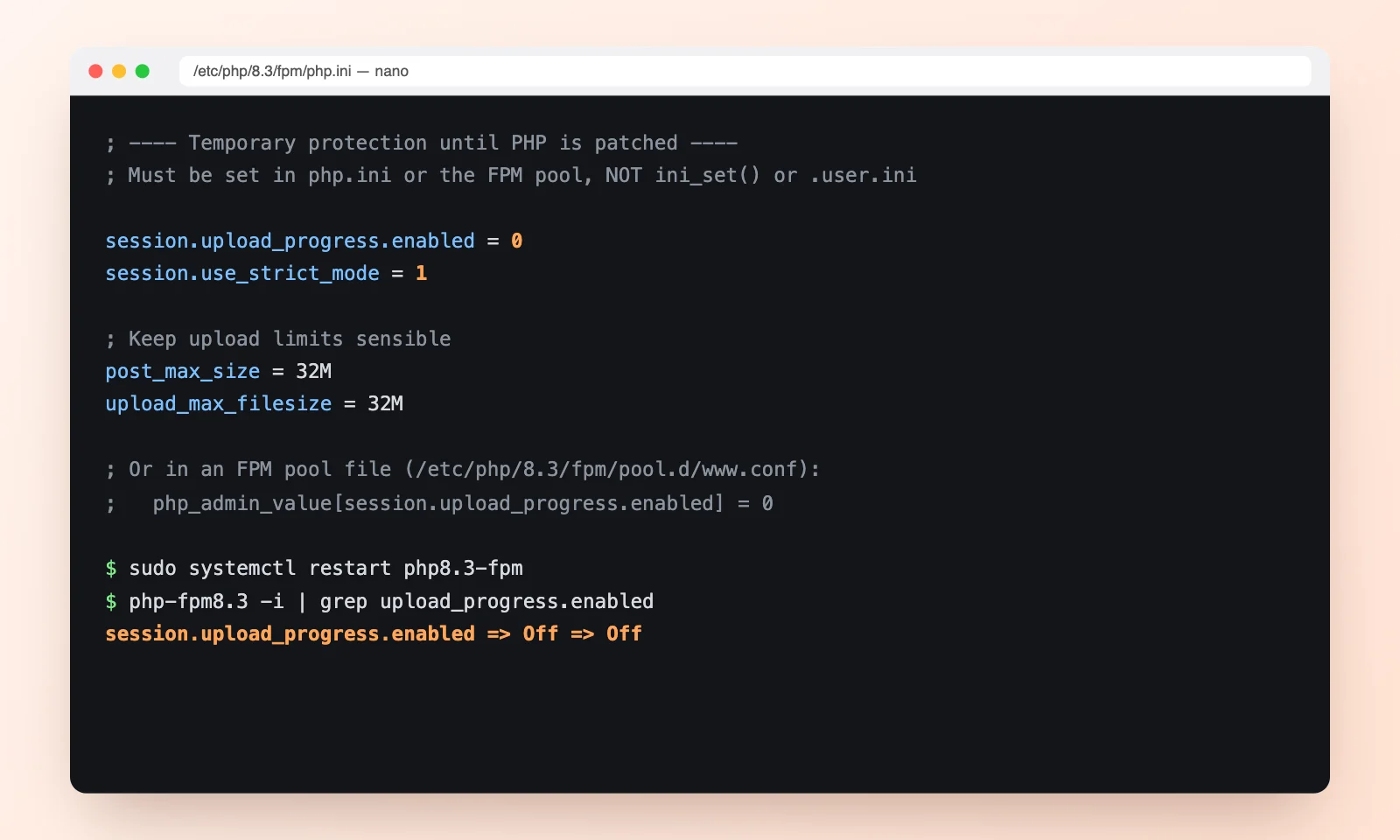
Upload progress blocks one confirmed attack path for CVE-2026-109619 only. It does nothing for CVE-2026-109618, so treat it as a short-term measure.
Step 6: Confirm the fix is live
- Recheck Site Health → Info → Server, or a phpinfo page, to confirm the version your website is really using.
- On Ubuntu, Debian or Red Hat, check the package version against the vendor’s security notice, since the PHP version number may not change.
- Restart queue workers, Laravel Octane, Supervisor jobs and anything else that keeps PHP running in the background.
- Look through your web server and PHP-FPM logs for crashes or strange file upload requests from the last few days.
What this means for WordPress and other CMS sites
This is a good moment to check the basics on every site you run. Sites on PHP 8.1 or older have no official fix and need an upgrade plan, and PHP 8.2 stops receiving security updates at the end of 2026. If your theme or plugins are holding you on an old version, we cover the wider picture in why use WordPress and our WordPress speed guide, and newer PHP versions are usually faster as well as safer.
Frequently asked questions
Is my WordPress site affected by PHP2Shell?
If it runs on an unpatched PHP version, yes. The bugs are in PHP itself, not in WordPress, so every PHP site is exposed until PHP is updated.
Will a WordPress update or security plugin fix it?
No. WordPress updates and security plugins work inside PHP. These bugs are triggered before WordPress loads, so only a PHP update fixes them.
Why is the patch only available for Windows?
php.net has always published ready-made downloads for Windows only. On Linux, the fixed PHP comes from your distribution or hosting company. Several were fixed on release day, others were still pending.
My server shows an old PHP version number after updating. Is it patched?
Possibly. Ubuntu, Debian and Red Hat copy security fixes into their own packages without changing the number. Check the package version and the vendor’s security notice.
What should I do if I am on PHP 8.1 or older?
Upgrade to PHP 8.3 or 8.4. There is no official release for older branches, only source patches, so staying put leaves your site exposed.
Need help patching?
If you are not sure which PHP your site runs on, or your host has not updated yet, get in touch. Our developers can check your server, apply the update or the temporary protection, and confirm your site is safe, usually the same day.
Sources: Yahoo Tech, PHP 8.4.27 release announcement, Tanium, Qualys. Package availability is as reported on 21 October 2026, so check your provider’s latest security notice.